Finding Balance.

Can we find a balance in the dizzying amounts of information out there?

Alec Couros presented an engaging and highly informative session about the digital world that encompasses our personal and professional lives. He started the presentation with this contradictory statement: the best thing about the internet is that it gives people a voice; the worst thing about the internet is that it gives people a voice. This paradox is definitive in Couros’ philosophy of finding a balance, reason, or truth, within the realm of abundant information. Although he is a victim of identity theft, he is still impassioned to educate about the potential hazards and countless benefits of the digital world. His aim is to develop critical literacies for both educators and students by sharing valuable resources.

Information Overload

I have to admit that while I was researching Couros, I was led down a path of interference and ended up wasting a lot of time. I was exactly like that student in the video that he showed: I was in a lot of spaces not getting anything accomplished. This needs to be addressed when we send our students to do research. We need them to become cognizant of this side-effect of the internet. Attention Literacy needs to be taught.

Who is pulling the string?

I also was very intrigued by the concepts of filter bubbles and cognitive bias. I am very aware and take into consideration the bias of anything I read or watch; so much that I only watch sports on television and am very particular as to what I read. But I was completely ignorant of how my viewings were being manipulated. It made me question whether I do consider all perspectives? Am I being critical enough in my opinions? Maybe not. It is our responsibility to inform students about the consideration of ALL perspectives in whatever situation they are in. We need to create a critical disposition in ourselves and our students.

What impressed me the most about Couros is his proactive attitude to the digital world. He has discovered a balance between abstract philosophy and real world examples. He has found a balance with being connected in an ever-changing and daunting world of information.

My Experiences with Video Conference classes

Mountain View School Division has a division-wide video conferencing course delivery system that allows for the smaller high schools to offer courses that may not be accessible to students otherwise. It is because of this system that students can obtain credits and experience courses that be would not be possible because of low enrolment. It is an excellent example of how technology is once again augmenting the school environment.

In my last spring placement, I was in one of these small high schools and was able to experience teaching via video conference. My split grade 9/10 French class, physically took place in Gilbert Plains and I video conferenced to another 15 students in the communities of Winnipegosis, Ethelbert, and Grandview. It was a challenging situation, especially since I like to incorporate a lot of games into language learning. But without it, these students would not have been able to experience any second language acquisition.

Challenges I Encountered:

  • took extra time to build rapport with students via camera
  • EAs in the other classrooms had to sometimes deal with classroom management
  • sometimes technology did not work

With that being said, the advantages of the video conference classes far outweigh the disadvantages. It was an excellent experience for me!

Does anyone else have any other experience teaching via video conference?

Tech Task 8: Infographics!

Helpful Infograph Site

Very simply, an infographic is information in a graphic form! By using visual elements, infographics make complex information easy to understand. Long documents of text and information can be condensed into an engaging one page of visual cues that help the viewer interpret the information.

Infographics would be very beneficial in the classroom. A significant percentage of students are visual learners and infographics are an excellent way to reinforce visual literacy. They can be used to introduce the life cycle of a frog in grade 2, breakdown difficult information in Biology, or establish a timeline in History. What interests me is that infographics allow for different interpretations of the visual elements. Students may be more keen to ask questions or give their thoughts on the information presented. I believe that information will be better understood the visual elements. Students would be able to better connect to the given information. Infographics could also be used as a summative assessment of their interpretations of their learning.

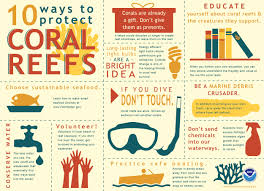
Great example of how this infographic could be used in an Ecology lesson.

Infographic I Created for Grade 9 ELA

Literary Elements.

Losing Control

 What would happen if some of that control was shifted, if trust was extended to students? 

Mike nantais 2016

Dr. Mike Nantais wrote an article summarizing his discoveries of the use of social media and how it affected a rural school. His goal was not to list the hows and whens of social media use, rather he aimed to discern the effects of social media on school culture and climate. His results determined that an altered level of connection and trust was established between students and teachers. He observed that when students were given more responsibility and autonomy for their learning; it augmented the accountability of student’s work, which in turn resulted in a more trusting and caring school environment. Dr. Nantais stated, that the “lesson here was that if we trust students, and involve them in decisions, most will return that trust”. That personifies a definite shift in traditional practice and control within the classroom walls.

Is loss of control the principal underlying issue over the use of social media in the classroom? Is it the shift in traditional teaching practice that creates alarm and anxiety when one combines the two words social media and classroom? I believe it is. Losing control is an intimidating and daunting concept when considering the classroom realm. But I do not consider it a loss of control, rather it is a transfer of control. As future educators, there has to be a point when we let go of some of that control and allow students to be accountable and responsible for learning.

This perceived notion of losing control with the use of social media connects to another contentious concept of teaching. That concept is inquiry based learning. There are countless studies that reinforce that authentic learning occurs when an inquiry based environment is established. But yet, teachers are reluctant to stray away from the traditional classroom environment. Is it because we do not want to create enduring understandings or authentic learning? Of course not. I believe it is the fear of losing control of students learning that these teaching practices encompass. Once again, as educators, we cannot view these teaching practices as a loss of control, rather it is a transfer of control where students gain autonomy and accountability.

Watch what occurs when both social media and inquiry based learning is combined

I am beginning to surmise that perhaps these very debatable practices of teaching are not only challenging and inspiring, but forces one to test the unknown and lose control.

Tech Task 6: Salut Mes Amis!

Valuable Resource!

Tradooit  is a site that I constantly have relied on for all my French courses along with creating work for students. Forget Google translate!!! Google translate literally translates whatever you type and does not take into consideration the nuances of the language. Tradooit is a terminology bank that contains texts from laws and government sites. It is a public memory bank that includes texts from a variety of sources that will meet the needs of language learners and professionals. The site realizes that certain contexts of the language cannot be literally translated, and gives you numerous examples that best serves your purpose.

Example of how the site puts phrases into context

Par exemple, pour la phrase social media in education, there are several examples of how it can be used, depending on the context that the reader/writer is using. The site searches for a string of words in context and then presents it in tabular form; English to the left, French to the right. You are able to find the correct context that suits your preference. It is quite brilliant.

Caution:

Tradooit is not a translation site for younger students. I would recommend this site for grade 11 or 12 French students that are more advanced in their language acquisition. The site uses language that is too advanced for younger students. For our younger FCC students, I would recommend Reverso as a starting translating tool. This website also is a spell checker and verb conjugating tool.

À la prochaine fois!

Tech Task 6 Show and Tell!

An app where student’s voices are heard!

I am showcasing the app Flipgrid! I know…… I know…… not very original since Mike had us use it for one of our first assignments. But honestly, when I first used it, I instantly thought of ways that I could incorporate the app in my classroom. Here is a list of reasons why I will incorporate this app in my future classroom! It is a free tool that allows teachers to upload discussion-style questions and have students answer via video responses. It is an easy way for me to use technology in the  

Sherri’s Reasons!

  • Student’s thinking is visible!
  • Pushes students to plan their responses and speak thoughtfully and effectively
  • Gives every student a voice! Not just the talkative ones!
  • App is easy to navigate and videos can be shared with learning communities from around the world or just to a parent’s computer
  • Students can explain their thinking or ideas for teachers which can be used for a formative assessment and personal feedback
  • Fantastic for EAL or FCC French class where some students may be too shy to speak in front of others
  • App comes with many lesson options
  • Videos are another and vital tool that students can learn to communicate
More ideas for Flipgrid!

Not quite there…..

Kristen Thompson gave a very candid and correlated perspective about the need to incorporate social media within the classroom. She stressed that prevalence, digital literacy, and relevance were justified reasons not to ignore these platforms in the classroom. Within her presentation she warned us promising new teachers that we best have a plan or goal for using social media; that just because students have a device in hand, does not teach digital literacy. She stressed that teachers need to reflect and consider whether this new tool allows the students to create and share? Does this tool expand students learning beyond the classroom walls? Does the time it takes to incorporate this tool worth it? I appreciated these statements.

Why? Because as she stated, you might not quite be there..”. Which I am not. I am beginning to see the value and worth of using these platforms within the class, but I need to learn more and get a definite plan in place. I would have to wrap my head around the enduring understandings or the big idea of using social media. What I have come to understand is the importance of collaboration among students, the need for an authentic audience, and using new tools for creation. Social media provides the means for all of this occur. In the future, I will have to push myself to be more informed and push boundaries to integrate these platforms within my classroom.

Tech Task 3: Being Connected

Does being connected make better teachers?

Looking at the videos about PLNs led to the question: Do I need to develop a Personal Learning Network? This is something that I will seriously consider in the near future. I have learned at my time at BU the importance of collaboration. The cohort that I have had the privilege of working with and learning from is the reason I have found success at BU. I do not want that collaboration to end when I venture into the profession of teaching. As teachers, we also need to model being life long learners and a PLN is an opportunity to do this. I do not believe that being “connected” will make one a better teacher. What it does is create opportunities for resources to be shared and built upon that may enhance your classroom teaching.

And what about the students? What are their thoughts about being connected and learning?

A Grade 12 student’s perspective on being connected and learning.
And oh the honesty of grade 9! Notice the difference in the quality of the answer. The most interesting statements come when asked about “thinking”.

The time has come.

Nothing is so powerful as an idea whose time has come.

Victor Hugo

Can these effectively be used within the classroom?

Photo by Tracy Le Blanc on Pexels.com

Tyler Letkeman presented his unique version of incorporating tech tools to create meaningful tasks within the classroom. Whether it is giving the class a specific audience by publishing an anthology of work, using Instagram and Snapchat to enhance Shakespeare, or using Google Forms to focus on vocabulary, Tyler gave specific examples how these platforms can be effectively used within the classroom. His passion for teaching English was blatantly obvious as he gave realistic and everyday uses for technology in his classroom. His #bestwordchallenge and the use of live leaderboards in Quizlet is brilliant and is something that I plan to create within my classroom. Using these platforms enhance English lessons by making it more relatable to your students as they showcase their mastery of social media. As Tyler commented, by using these apps students do “complex mental gymnastics” which creates and can allow for a higher level of thinking and understanding. It allows students to demonstrate their learning through another means of communication. I can use these tools as an assessment for learning. I can check to see if student’s are understanding lessons that I am teaching and it will not be in the form of the dreaded quiz or worksheet! I also appreciated his advice on the use of digital copies; to alleviate the problem of “I lost my sheet”. I plan to have shared folders that my students can access from anywhere and use the link shortener app tiny.cc

Tyler even motivated me to create a meme!

Tyler is very fortunate to work in BSD, a division that seems to be abundant in resources and access to technology. But what about those divisions that are not as fortunate? One of my previous placements in rural Manitoba, there was one laptop per 8 students, which would make these lessons seem impossible. Teachers were more concerned about having enough textbooks or sometimes heat in the room rather than access to technology. As future educators, we cannot take for granted that individual students will have the same access to technology as others. “While significant potential exists for technology to improve learning opportunities for schools with low-income students, issues of access and equity continue to be a challenge today” (Young, 2004). We cannot assume or single out students that do not have the advantage of certain technologies. In this case, lessons would have to be adapted or modified to still be able to showcase the use of technology in the classroom. We need to be cognizant of this issue when incorporating technology into our educational plans.

Another lesson learned! Looking forward to reading other posts!

Tech Task 2 Digital Identity

Digital Footprints

To no one’s surprise, I do not have a very distinct or profound digital footprint. I do not lose sleep over this. My digital identity should not be the issue. Let’s think about our future students. What is imperative is that we convey the message that their digital identity cannot be erased. As teachers, we constantly say “it’s all right to make mistakes” but unfortunately, the digital world does not allow that to happen. The digital world does not forget. It allows for a mistake to be constantly repeated. Students have a difficult enough time discovering their real life identity, and now they have to figure out their virtual identity. As a future teacher, I hope to instil the message that a student’s digital life should complement their real life. Do I know exactly how to do this? Nope. What I do know is that I hope to be a positive role model for them. I do not base my self worth on “likes” or “views”. I do not like selfies and will not attempt to get the perfect picture for social media. I will constantly tell my students that I only care about the real, not the virtual. Perhaps this is naive, but to me, real is real.

Excellent video about student’s and their digital identity

Check out the link to see how digital life interferes with real life:

https://www.theweathernetwork.com/news/articles/bikini-climber-gigi-wu-freezes-to-death-after-falling-from-mountain-yushan-mountain-central-taiwan/123062